Traps to Developers
HTML and CSS
-
min-widthisautoby default. Inside flexbox or grid,min-width: autooften makes min width determined by content.min-widthhas higher priority thanflex-shrink,width,max-width, etc. It's recommended to setmin-width: 0. Same formin-height. See also -
Horizontal and vertical are different in CSS:
- Normally
width: autotries fill available space in parent. Butheight: autonormally tries to just expand to fit content. - For inline elements, inline-block elements and float elements,
width: autodoes not try to expand. margin: 0 autocenters horizontally. Butmargin: auto 0normally becomemargin: 0 0which does not center vertically. But in a flexbox withflex-direction: column,margin: auto 0can center vertically. 1- Percentage
margin-topmargin-bottompadding-toppadding-bottomuse parent width as base value, not height. 2 - Margin collapse happens vertically but not horizontally.
- Some of the above behave differently when layout axis flips (e.g.
writing-mode: vertical-rl). See also
- Normally
-
Margin collapse.
- Two vertically touching siblings can overlap vertial margin. Child vertical margin can "leak" outside of parent.
- Margin collapse doesn't happen when
borderorpaddingspcified. Don't try to debug margin collapse by coloring border. Debug it using browser's devtools. - Margin collpse doesn't happen in flexbox or grid. (If you want margin collapse in flexbox, use
gapinstead.) - Block formatting context (BFC) avoids child margin from leaking out of parent.
display: flow-rootcreates a BFC. (Things likeoverflow: hidden,overflow: auto,overflow: scroll,display: tablealso create BFC but with side effects).3 - Related: margin can be negative. Negative margin can make elements overlap and make child leak outside of parent. BFC doesn't prevent negative margin from working.
-
If a parent only contains floating children, the parent's height will collapse to 0, and the floating children will leak. Can be fixed by BFC.
-
If the parent's
displayisflexorgrid, then the child'sfloathas no effect -
In these cases, it will start a new stacking context:
- The attributes that give special rendering effects (
transform,filter,perspective,mask,opacityetc.) position: fixedorposition: sticky- Specifies
z-indexandpositionisabsoluteorrelative - Specifies
z-indexand the element is inside flexbox or grid - ......
Stacking context can cause these behaviors: 4
z-indexonly works within one stacking context.position: stickyonly works within one stacking context.overflow: visiblewill still be clipped by stacking context.background-attachment: fixedwill position based on stacking context.opacityis "relative" to parent. Childopacity:1in transparent parent won't make it more opaque than parent.- Stacking context can affect the coordinate system of
position: absoluteorfixed.
- The attributes that give special rendering effects (
-
On mobile browsers, the top address bar and bottom navigation bar can go out of screen when scrolling down.
100vhcorrespond to the height when the two bars gets out of screen, which is larger than the height when the two bars are on screen. The modern solution is100dvh. -
In Windows/Linux, scrollbar takes space. (But in macOS or mobile it doesn't take space. 5) Scrollbar can steal space from inner content. The
width: 200pxmeans content width plus scrollbar width is 200px, so scrollbar makes inner content's width is smaller than 200px (the same applies even withbox-sizing: content-box). 6 -
Scrollbar may appear/vanish if content height changes, which can cause layout shift. Use
scrollbar-gutter: stableto avoid layout shift. -
About scrollbar styling: the standard scroll bar styling supports color and width but doesn't support many other features (e.g. round corner scrollbar). The
-webkit-scrollbarnon-standard pseudo-elements supports these features but FireFox doesn't support them. In modern browser, if standard scrollbar styling is used, then the-webkit-scrollbarhas no effect. -
overflow-xandoverflow-yare not independent. If one isscroll, the other isvisible, thenvisiblebecomesauto. see also. -
position: absoluteis not based on its parent. It's based on its nearest positioned ancestor (the nearest ancestor that haspositionberelative,absoluteor creates stacking context). -
position: stickydoesn't work if parent (or indirect parent) hasoverflow: hidden. -
If the parent's width/height is not pre-determined, then percent width/height (e.g.
width: 50%,height: 100%) doesn't work. 7 -
CSS transition doesn't work between
height: 0andheight: auto. Solutions:- Use JS to set CSS height to
scrollHeight. - Put it in grid and transition from
grid-template-rows: 0frto1fr. - Use
calc-size(), see also 8. 9 - Use
interpolate-size10
- Use JS to set CSS height to
-
In JS, reading size-related value (e.g.
offsetHeight) cause browser to reflow (re-compute layout) which may hurt performance (and it interferes with transition). See also. -
CSS transition doesn't work right when element is added. Modern solution is
@starting-style. Old solution is to cause reflow in initial state then set to animation finish state. -
display: inlineignoreswidthheightandmargin-topmargin-bottom11 -
The
<img>,<svg>,<video>and<canvas>havedisplay: inlineby default, which layouts them with text (can interfere with line height). In most cases they should havedisplay: block. Also it's recommended to addmax-width: 100%to avoid large image overflowing. (See also A Modern CSS Reset) -
Whitespace collapse. See also
- By default, newlines in html are treated as spaces. Multiple spaces together collapse into one.
<pre>doesn't collapse whitespace. But HTML parser removes a line break in the beginning and end of<pre>content.- Often the spaces in the beginning and end of content are ignored, but this doesn't happen in
<a>. - Any space or line break between two
display: inline-blockelements will be rendered as spacing. This doesn't happen in flexbox or grid.
-
text-alignaligns text and inline things, but doesn't align block elements (e.g. normal divs). -
text-align: centerwill not center when content is too wide. It will align left in that case. See also -
By default
widthandheightdoesn't include padding and border.width: 100%withpadding: 10pxcan still overflow the parent.box-sizing: border-boxmake the width/height include border and padding. -
The
<html>and<body>and viewport are 3 different things.- Making web page height fill viewport requires both
htmlandbodyto beheight: 100%. (Another solution isheight: 100dvh) - Viewport propagation. For background-related styles and
overflow, applying to eitherbodyorhtmlwill all make them apply to viewport. But if bothhtmlandbodyspecifies background,<body>'s background won't propagate to viewport and only cover<body>area. If bothhtmlandbodyhaveoverflow: scrollthen there will be two scrollbars. - The body with
width: 100vwoverflows horizontally if viewport has scrollbar that takes space.width: 100%can workaround that issue.
- Making web page height fill viewport requires both
-
About override:
- CSS import order matters. The latter-imported ones can override the earlier ones.
- The styles directly written in HTML are inline styles, which can be set by JS. Inline styles can override attributes in
.cssfiles (when both are not!important).!importantattribute in.cssfiles can override non!importantinline style. - Browser puts some user agent styles to
<input>and<button>(e.g.color,font-family). So<input>and<button>will not inherit some styles from parent. - See CSS cascade for complete details.
-
About hiding:
- Parent
visibility: hiddendoesn't enforce all children to be hidden. If child hasvisibility: visibleit will still be shown. This don't apply toopacity: 0ordisplay: none. - An element with
opacity: 0can still be interacted (e.g. click button). This doesn't apply todisplay: noneorvisibility: hidden. display: noneremoves element from layout. This doesn't apply tovisibility: hiddenoropacity: 0.
- Parent
-
Font size and line height. See Deep dive CSS: font metrics, line-height and vertical-align
-
The
<!DOCTYPE html>in the beginning of html is important. Without it, browsers will use "quirks mode" which make many behaviors different. See also -
- It's recommended to specify
widthandheightattribute in<img>tag to avoid layout shift due to image loading delay.
- It's recommended to specify
-
JS-in-HTML may interfere with HTML parsing. For example
<script>console.log('</script>')</script>makes browser treat the first</script>as ending tag. See also -
Virtual scrolling breaks browser's text search functionality.
-
Trailing slash in URL. If current URL is
https://xxx.com/aaa/bbb, then<img src="image.png">use imagehttps://xxx.com/aaa/image.png. But if current URL ishttps://xxx.com/aaa/bbb/(with trailing slash), then image path ishttps://xxx.com/aaa/bbb/image.png -
Shadow dom does some isolation, but some things are not isolated. CSS variables are shared with shadow dom. The size of
1remis always based onfont-sizeof<html>even in shadow dom. -
XSS of
javascript:URL. Forhrefproperty, when it starts withjavascript:followed by JS code, clicking it executes JS code. This needs to be sanitized when URL comes from user data. -
It's possible to receive multiple update messages between two frames. Not batching can re-draw canvas (or re-generate svg) multiple times between two frames, which hurts performance. It's recommended to do batching by flag and
requestAnimationFrame, see also.
Unicode and text
- The concepts: code point, scalar value, grapheme cluster:
- Grapheme cluster is the "unit of character" in GUI. An emoji is a grapheme cluster, but it may consist of many scalar values.
- In UTF-8, code point and scalar value are the same thing. A code point can be 1, 2, 3 or 4 bytes.
- In UTF-16, each UTF-16 code unit is 2 bytes. A scalar value can be 1 code unit (2 bytes) or 2 code units (4 bytes, surrogate pair 12).
- JSON string
\uescape uses surrogate pair."\uD83D\uDE00"in JSON is only one scalar value.
- Strings in different languages:
- Rust use UTF-8 for in-memory string.
s.len()gives byte count. Rust does not allow directly indexing on astr(but allows subslicing).s.chars().count()gives code point count. Rust is strict in UTF-8 code point validity. - Java, C# and JS's string encoding is WTF-16. WTF-16 is similar to UTF-16 but allows invalid surrogates. String length is code unit count. Indexing works on code units. Each code unit is 2 bytes. One scalar value can be 1 code unit or 2 code units. 13
- In Python,
len(s)gives scalar value count. Indexing gives a string that contains one scalar value. - C++
std::stringand Golangstringhave no constraint of encoding and are similar to byte arrays. - No language mentioned above do string length and indexing based on grapheme cluster.
- In SQL,
varchar(100)limits 100 scalar values (not bytes).
- Rust use UTF-8 for in-memory string.
- When reading text data in chunk, don't convert individual chunks to string then concat, as it may cut inside a UTF-8 code point.
- Some Windows text files have byte order mark (BOM) at the beginning. It's U+FEFF zero-width no-break space (it's normally invisible). FE FF means file is in big-endian UTF-16. EF BB BF means UTF-8. Some non-Windows software doesn't handle BOM.
- When converting binary data to string, often the invalid places are replaced by � (U+FFFD).
- Directly putting binary data to string loses information, except in C++ and Golang. Even in C++ and Golang it will still lose information after serializing to JSON. Its recommended to use Base64 for binary data in JSON.
- Confusable characters. Some common examples:
"and“”. Microsoft Word and Google Doc auto-replace former to latter.- – (en dash) and - (minus-hyphen). Google Doc auto-replace -- to en dash.
- ......
- Normalization. For example é can be U+00E9 (one code point) or U+0065 U+0301 (two code points). String comparision works on binary data and don't consider normalization.
- Zero-width characters, Invisible characters
- For example, there are many spaces: Normal space U+0020, no-break space U+00A0, em space U+2003, etc. The normal space and no-break space looks the same.
- Line break. Windows often use CRLF
\r\nfor line break. Linux and macOS often use LF\nfor line break. - U+0000 is a valid code point. C++
std::stringand Ruststrcan hold it. But C libraries often treat it as string terminator. Null byte injection. - Locale (elaborated below).
Floating point
-
NaN. Floating point NaN is not equal to any number including itself. NaN == NaN is always false (even if the bits are same). NaN != NaN is always true. Computing on NaN usually gives NaN (it can "contaminate" computation). NaN corresponds to many different binary values.
-
There are +Infinity and -Infinity. They are not NaN.
-
There is a negative zero -0.0 which is different to normal zero. The negative zero equals zero when using floating point comparision. Normal zero is treated as "positive zero". The two zeros behave differently in some computations (e.g.
1.0 / 0.0 == Inf,1.0 / -0.0 == -Inf,log(0.0) == -Inf,log(-0.0)is NaN) -
JSON standard doesn't allow NaN or Infinity:
- JS
JSON.stringifyturns NaN and Infinity to null. - Python
json.dumps(...)will directly writeNaN,Infinityinto result, which is not compliant to JSON standard.json.dumps(..., allow_nan=False)will raiseValueErrorif has NaN or Inf. - Golang
json.Marshalwill give error if has NaN or Inf.
- JS
-
Directly compare equality for floating point may fail due to precision loss. Compare equality by things like
abs(a - b) < epsilon. For double-precision floating point,epsiloncan be . 14 -
JS use floating point for all numbers. The max "safe" integer is . Outside of the "safe" range, most integers cannot be accurately represented. For large integer it's recommended to use
BigInt.If a JSON contains an integer larger than that, and JS deserializes it using
JSON.parse, the number in result will be likely inaccurate. The workaround is to use other ways of deserializing JSON or use string for large integer. 15 -
Floating-point is 2-based. It cannot accurately represent most decimals. 0.1+0.2 gets 0.30000000000000004 .16
-
Associativity law and distribution law doesn't strictly hold because of precision loss. See also: Defeating Nondeterminism in LLM Inference, Taming Floating-Point Sums 17
-
Division is much slower than multiplication (except when divisor is constant, compiler optimizes it into multiplying reciprocal). Multiplying reciprocal is much faster. This also applies to integers.
-
These things can make different hardware have different floating point computation results:
- Hardware FMA (fused multiply-add) support.
fma(a, b, c) = a * b + c(in some placesa + b * c). Most modern hardware make intermediary result in FMA have higher precision. Some old hardware or embedded processors don't do that and treat it as normal multiply and add. - Floating point has a Subnormal range to make very-close-to-zero numbers more accurate. Some old hardware and embedded processors treat subnormals as zero. (Even in the processors that support subnormal, computing may be slow on subnormal, see also)
- Rounding mode. The standard allows different rounding modes like round-to-nearest-ties-to-even (RNTE) or round-toward-zero (RTZ). In X86 and ARM, rounding mode is thread-local mutable state can be set by special instructions. It's not recommended to touch the rounding mode as it can affect other code.
- Math functions (e.g. sin, log) may be less accurate in some embedded hardware or old hardware.
- Legacy X86 FPU (80-bit floating point registers and per-core rounding mode state).
- ......
- Hardware FMA (fused multiply-add) support.
-
Floating point precision is low for values with very large absolute value or values very close to zero. It's recommended to avoid temporary result to have very large absolute value or be very close-to-zero.
-
Iteration can cause error accumulation. For example, if something need to rotate 1 degree every frame, don't cache the matrix and multiply 1-degree rotation matrix every frame. Compute angle based on time then re-calculate rotation matrix from angle.
Time
- Leap second. Unix timestamp is "transparent" to leap second. Converting between Unix timestamp and UTC time assumes leap second doesn't exist. It's used with leap smear: make the time "stretch" or "squeeze" near a leap second to "hide" existence of leap second.
- Time zone. UTC and Unix timestamp is globally uniform. But human-readable time is time-zone-dependent. It's recommended to store UTC timestamp in database and convert to human-readable time in UI, instead of storing human-readable time in database.
- Daylight Saving Time (DST): In some regions people adjust clock forward by one hour in warm seasons. When DST ends, 1:00 AM to 2:00 AM (in some regions 2:00 AM to 3:00 AM) will run twice, so converting human-readable time in this range to timestamp is ambiguous. Python has
foldto address this ambiguity. - NTP sync may cause time to "jump backward" or "jump forward".
- It's recommended to configure the server's time zone as UTC. Different nodes having different time zones will cause trouble in distributed system. After changing system time zone, the database may need to be reconfigured or restarted.
- There are two clocks: hardware clock and system clock. The hardware clock itself doesn't care about time zone. Linux treats it as UTC by default. Windows treats it as local time by default.
- Verification of certificate uses time. If time is inaccurate, SSL/TLS may not work.
- The "timestamp" may be in seconds, milliseconds or nanoseconds.
- About
Mandmin date format: in Java date format,Mis month,mis minute. But in Pythondatetime,mis month,Mis minute. - In Java
Dateand JSDate, month number starts by 0, but day number starts by 1. - In DuckDB, when importing a CSV, it guesses date format based on samples by default. There is ambiguity between
DD-MM-YYYYandMM-DD-YYYY. If all day numbers <= 12, DuckDB may guess wrong. See also - Storing time in SQL databases:
- In PostgreSQL,
timestamp with time zone(timestamptz) is recommended. Although it has "with time zone", it actually doesn't store the time zone. It stores timestamp in UTC. In SQL console, its shown value is auto-converted to session time zone.- Avoid using any zone-less time values on
timestamptz, such as'2026-09-30 14:00:00', or javaLocalDateTime. It may wrongly assume time zone is session time zone (or JVM default time zone). - Don't compare
timestamp with time zonewithtimestamp.
- Avoid using any zone-less time values on
- In MySQL, it's recommended to store UTC time as
datetime, or timestamp asbigint.- The MySQL
timestampis 32-bit and cannot represent time after 2038-01-19 03:14:07.
- The MySQL
- Simply storing UTC timestamp in
bigintavoids all implicit time zone conversion traps, and works across databases.
- In PostgreSQL,
Java
==compares object reference. Should use.equalsto compare object content (UseObjects.equalsto handle null).- Forget to override
equalsandhashcodefor data class. It will use object identity equality by default in map key and set. - Mutate the content of map key object (or set element object) makes the container malfunciton (unless the mutation doesn't affect
equalsandhashcode). - Not all
List<T>are mutable.Collection.emptyList()gives immutable list.Arrays.asList()gives list that cannot add element. - Map
getacceptsObject, passing a wrong type won't cause compile error. - A method that returns
Optional<T>may returnnull. - Null is ambiguous. If
get()on a map returns null, it may be either value is missing or value exists but it's null (can distinguish bycontainsKey). Null field and missing field in JSON are all mapped to null in Java object. See also. Similarily, privimtive value 0 can also be ambiguous. - Implicitly converting
Integertointcan causeNullPointerException, same forFloat,Long, etc. - Return in
finallyblock swallows any exception thrown in thetryorcatchblock. The method will return the value fromfinally. - About interrupt: Some libraries do blocking IO but ignores interrupt. Some libraries wrap
InterruptedExceptioninto other exceptions. - If a class's static initializer throws an exception, the class fails to load (using it gives
NoClassDefFoundError) and it won't retry loading. Can only recover by restarting process.- It's not recommended to do IO in class static initializer, except for reading resources in jar. The initialization that does IO should be retryable.
- Thread pool does not log exception of tasks sent by
.submit()by default. You can only get exception from the future returned by.submit(). Don't discard the future. AndscheduleAtFixedRatetask silently stop if exception is thrown. - When debugging, debugger will call
.toString()to local variables. Some class'.toString()has side effect, which cause the code to run differently under debugger. This can be disabled in IDE. - Before Java24 virtual thread can be "pinned" when blocking on
synchronizedlock, which may cause deadlock. It's recommended to upgrade to Java 24 if you use virtual thread. finalize()running too slow blocks GC and cause memory leak. Exceptions out offinalize()are not logged. A dead object can resurrect itself infinalize(). It's recommended to useCleanerrather than overridingfinalize.- When using
Cleaner, the registered cleanup callback should not (directly or indirectly) capture the target object.
- When using
SimpleDateFormatis not thread-safe.OmitStackTraceInFastThrowoptimization causes exception to have no stacktrace. See also. The first few exceptions have stacktrace, so the stacktrace may be in early logs.- JVM has its own DNS cache in memory. It's independent to the operating system's DNS cache.
- Spring AOP doesn't work when directly invoking methods from
this. - Java built-in serialization has many issues (security vulnerability, cannot auto adapt adding fields, bypasses constructor,
transient finalis broken, etc.). It's not recommended to use it. Note that Flink still uses Java serialization for job graph18. - A
finalfield may be read before initialization, which reads the default value (0 for primitive type, null for ref type). Same applies tostatic finalfields.- The default value of
finalfield can be observed outside of constructor, if constructor throws exception andthisescapes (e.g. by puttingthisto a static field). An object can be partially-initialzied.
- The default value of
- In
WeakHashMap, if value strong-references key (directly or indirectly), the key will strong-referenced and won't be auto-removed. This different to JSWeakMap, where value referencing key doesn't prevent key collection.19
Golang
append()reuses memory region if capacity allows. If a slice is shared, two places appening it may cause unwanted overwritten (or data race).deferexecutes when the function returns, not when the lexical scope exits.defercapture mutable variable's latest value.- About
nil:- There are nil slice and empty slice (the two are different). There are also nil map and empty map. The nil map can be read like an empty map, but nil map cannot be modified. (There is no nil string, only empty string.)
- Interface
nilweird behavior. Interface pointer is a fat pointer containing type info and data pointer. If the data pointer is null but type info is not null, then it will not equalnil. - Receiving from or sending to
nilchannel hangs forever.
- Before Go 1.22, loop variable capture issue.
- Different kinds of timeout. The complete guide to Go net/http timeouts
- Having interior pointer to an object keeps the whole object alive. This may cause memory leak.
- Forgetting to cancel context cause
<-ctx.Done()to deadlock. - For
WaitGroup,Addmust be called beforeWait. Don'tAddin a new goroutine (unless with proper synchronization). sync.Mutexshould be passed by pointer not value. Same applies tosync.WaitGroupsync.Condnet.Connetc. But slices, maps and channels can be passed by value.- When using
go func() {...}, should carefully avoid capturing outsideerrvariable. Capturing outsideerrwill cause data race. See also - If channel consumer exits, producing to channel will hang, causing goroutine leak. (Golang channels are unbuffered by default. If consumer exits producer will hang. Even if buffered, producer still hangs when buffer is full.) Debug using Goroutine leak profiler.
C/C++
- Storing a pointer to an element in
std::vectorand then grow the vector, vector may re-allocate content, making element pointer invalid. Same applies to other containers. - If a function accepts
std::string&, and literal string (e.g."x") is passed as argument, thestd::stringobject will be short-lived. - Directly pass-by-value can do implicit copy that hurts performance.
- There is copy elision that helps in many cases. But copy elision doesn't work when passing local variable (even it's the last use of local variable). For example, if function
gaccepts arg by value, theng(f())can have copy elision, butauto x = f(); g(x);cannot elide copy to g's argument. It's recommended to make functions accept object by reference not value.
- There is copy elision that helps in many cases. But copy elision doesn't work when passing local variable (even it's the last use of local variable). For example, if function
- Iterator invalidation. Modifying a container when looping on it.
std::views::filtermalfunctions when element is mutated that predicate result changes in multi-pass iteration. See also, See alsostd::removedoesn't remove but just rearrange elements.eraseactually removes.- Destructing a deep tree structure can stack overflow. Solution is to replace recursion with loop in destructor.
std::shared_ptritself is not atomic (although its reference count is atomic). Mutating ashared_ptritself is not thread-safe.std::atomic<std::shared_ptr<...>>is atomic but uses locking.- For std maps,
map[key]is not a read-only operation. It will auto-insert default value if the corresponding entry doesn't exist. See also - For
std::vector<bool>, result ofoperator[]is a proxy object, notbool&. - Undefined behaviors. The compiler optimizations keep defined behavior the same, but can freely change undefined behavior. Triggering undefined behavior can make program break under optimization. See also, see also.
- Accessing uninitialized memory is undefined behavior.
- After converting binary data byte pointer to struct pointer, using it is treated as using uninitialized memory, even if the memory is initialized, because the object lifetime hasn't started20 (and it also violates strict aliasing rule).
- Using a local variable before initializing it is also accessing uninitialized memory.
- (Before C++26) For a local variable without explicit initialization (e.g.
SomeType value;), whether it initializes depend on many factors, see also. It's recommended to always initialize local variable (e.g.SomeType value{};). (In C++ 26 it changed)
- Accessing using null pointer or dangling pointer is undefined behavior.
- Integer overflow/underflow is undefined behavior. Note that unsigned integer can underflow below 0. Don't use
x > x + 1to check overflow as it will be optimized tofalse. - Integer dividing by 0 is undefined behavior. (But floating point dividing by 0 is not undefined behavior. It gives ±Infinity or NaN.)
- Aliasing.
- Strict aliasing rule. If there are two pointers with type
A*andB*, and there is no subtyping relation betweenAandB, then compiler assumes two pointer can never equal. If they equal, and both pointers are used for accessing memory, then it's undefined behavior. One exception is byte pointer. 21 - Pointer provenance. Each heap allocation or local variable or global variable is a provenance. If two pointers from two different provenances equals, and both pointers are used for accessing memory, then it's undefined behavior. See also. 22
- Strict aliasing rule. If there are two pointers with type
constcan mean both read-only and immutable:- If the original object is
const(e.g.const SomeType someValue,new const SomeType()), then it's deemed immutable. If you useconst_castto turn its pointer toT*then change content, it's undefined behavior. 23 - If the original object is not
const, you can turn pointer to it asconst T*, in this caseconstmeans read-only 24. You can change the object without triggering undefined behavior. std::moveused on const object cannot avoid deep copying. 25
- If the original object is
- If
bool's binary value is neither 0 or 1, using it is undefined behavior. Similarily if an enum's binary value is not valid, using it is undefined behavior. - Unaligned memory access is undefined behavior.
- Data race is undefined behavior.
- Infinite loop without side effect (no write to shared memory, no IO, etc.) and without volatile load or atomic load is undefined behavior.26
- Undefined behavior can "travel back in time". For
if (a) { b(); }, ifb()unconditionally triggers undefined behavior, then compiler can assumeais always false. Ifais true then it triggers undefined behavior before executingb(). The deduction can go earlier: the inputs that causeato be true can trigger undefined behavior before computinga.
- Accessing uninitialized memory is undefined behavior.
- Global variable initialization runs before
main. Static Initialization Order Fiasco. - Destructors have
noexceptby default. If exception is thrown out of anoexceptfunction, whole process will crash. - If destructor is implemented, then you should implement copy constructor or disable copy constructor. If not, it may implicitly copy then double free.
- If polymorphism is involved, base class destructor should be
virtual. Otherwise freeing base-class-typed pointer won't run subclass fields' destructor. - When using raw pointer instead of smart pointer, exception may cause delete to not run which causes memory leak.
- In signal handler, don't do any IO or locking, don't
printformalloc. - Implicit conversion between signed and unsigned. If
ais signed -1,bis unsigned 0, thena > bis true, because it auto-convertsainto unsigned integer.- Note that
charmay be signed or unsigned, depending on platform. It's recommended to always usesigned charorunsigned char, notchar. Apple ARMcharis signed, gcccharis unsigned in Android, but signed in other platforms.
- Note that
- Floating point number can implicitly convert to integer.
- The constructor that takes only one argument enables implicit conversion, except when that constructor is
explicit. - If the same header file is included in two
.cppfiles with different macros, and the macro difference affect the content ininlinething ortemplatething or type definition, then it violates ODR (one definiton rule). There will be different compiled functions with the same symbol name, and linker nondeterministically chooses one. - The dynamic library can bundle its own allocator27. One allocator's allocation should not be freed in another allocator. Passing container (e.g.
vector) is only safe when allocator matches (and ABI matches). When passingunique_ptracross dynamic libraries, it's recommended to use custom deleter. mallocmay return null. When there is no OS overcommit, checking for null can gracefully handle out-of-memory. When overcommit is enabled (often enabled by default),malloccan succeed despite out-of-memory, then process get killed when accessing allocated memory. The same also happens in containers.- But it's still recommended to check for null (can abort on null), because it may still return null under overcommit28, and using null pointer is undefined behavior.
- In C++, the equivalence of
mallocreturning null innewisstd::bad_allocexception. When exception is disabled, usenew (std::nothrow) TheType, which may give null.
- C++ namespace pollution. It's not recommended to use
using namespace std;. Including a header orusinga namespace may change function overloading behavior. - Alignment can cause padding in struct.
- The padding may waste space. Reordering fields may save space.
- Initializing a struct's fields doesn't reset the padding bytes. The padding bytes may contain the values of previous data in same address. If struct has padding, don't use
memcmpto compare equality. Need to compare each field.
- Don't use
=to compare equality. - Don't forget
breakin switch, unless you want fallthrough.
Python
- Default argument is a stored value that will not be re-created on every call.
- Be careful about indentation when copying and pasting Python code.
- In conditons, these things are "falsy": 0,
None, empty string, empty container. Be careful if 0 or empty container represents valid value. Also it can be controlled by implementing__bool__method. - GIL (global interpreter lock) doesn't protect against on-disk data race. Two concurrent threads reading and writing same file may cause data race in file. GIL releases during IO.
- ABI incompatibility. Python version doesn't follow semantic versioning. The native library that works with Python 3.13.x is likely incompatible with Python 3.14.x. Also, the debug version has different ABI to non-debug version. The free-threaded version has different ABI to non-free-threaded version.
- asyncio uses weak references to hold tasks. If a task is not referenced elsewhere it could be silently killed.
Rust
- Rust async traps. Summarize:
- Don't block scheduler thread. Don't use std mutex or any blocking IO in async code, unless it only blocks for very short time.
- Async code can exit at any await point. Async cleanup should use drop (e.g. scopeguard). Spawning prevents cancellation propagation.
SQL Databases
- Null is special:
x = nulldoesn't work.x is nullworks. Null does not equal itself, similar to NaN.- Unique index allows duplicating null (except in Microsoft SQL server).
select distincttreat nulls as the same in some databases.count(x)andcount(distinct x)ignore rows wherexis null.
- Date implicit conversion can be timezone-dependent.
- About join:
- In MySQL (InnoDB), the
utf8charset doesn't allow 4-byte UTF-8 scalar value. Usecharacter set utf8mb4. - MySQL (InnoDB) default to case-insensitive.
- MySQL (InnoDB) can do implicit conversion by default.
select '123abc' + 1;gives 124. - MySQL (InnoDB) gap lock may cause deadlock.
- In MySQL, you can select a column and group by another column. It gives nondeterministic result. (this is disabled start from MySQL 5.7.5, see also)
- MySQL client charset can be different to server charset. Sometimes client charset default to Latin1 even if server charset default to UTF-8. Use
show variables like 'character_set%';to check. - Multi-column index
(x, y)cannot be used when only filtering ony. (Except when there are very few differentxvalues, database can do a skip scan that uses the index.) Similarilylike 'abc%'can use index butlike '%abc'cannot. - In SQLite, when table is not
strict, values are dynamically-typed, but it has "type affinity" that does implicit conversion 29 It's recommended to always usestricttable. - SQLite by default does not do vacuum. The file size only increases and won't shrink. To make it shrink you need to either manually
vacuum;or enableauto_vacuum. - In SQLite if you don't set
busy_timeout, operations will fail directly if database is locked, without auto retry. - Foreign key implicit locking may cause deadlock.
- When loading database backup, if there is foreign key, child table cannot be loaded before parent table.
- Locking may break repeatable read isolation (it's database-specific).
- Distributed SQL database may doesn't support locking or have weird locking behaviors. It's database-specific.
- If the backend has N+1 query issue, the slowness may won't be shown in slow query log, because the backend does many small queries serially and each individual query is fast.
- Long-running transaction can cause problems (e.g. locking). It's recommended to make all transactions finish quickly.
- If a string column is used in index or primary key, it will have length limit. MySQL applies the limitation when changing table schema. PostgreSQL applies the limitation by erroring when inserting or updating data.
- PostgreSQL
notifyinvolves global locking if used within transaction, see also. Also,listenmalfunctions when used with connection pooling. It also has message size limit. - In PostgreSQL, incrementally updating a large
jsonbis slow, as it internally recreates wholejsonbdata. - Storing UUID as string in database wastes performance. It's recommended to use database's built-in UUID type.
- Also, in some places UUID text doesn't have hyphen (e.g.
6cdd4753e57047259dd7024cb27b4c4finstead of6cdd4753-e570-4725-9dd7-024cb27b4c4f). Need to consider it when parsing and comparing UUID.
- Also, in some places UUID text doesn't have hyphen (e.g.
- Don't treat auto-increment ID as "row number". Auto-increment id is not always contiguous. And auto-increment id order is not always same as transaction commit order (a transaction can allocate auto-increment id early but commit late). And the auto-increment id of firstly-inserted row is not always 1.
- Whole-table locks that can make the service temporarily unusable:
mysqldumpused without--single-transactioncause whole-table read lock.- In PostgreSQL,
create unique indexoralter table ... add foreign keycause whole-table read-lock. To avoid that, usecreate unique index concurrentlyto add unique index. For foreign key, usealter table ... add foreign key ... not valid;thenalter table ... validate constraint .... - In MySQL (InnoDB) an
updateordeletethat cannot use index may lock the whole table, not just targeted rows.
- Querying which range a point is in by
select ... from ranges where p >= start and p <= endis inefficient, even when having composite index of(start, end). 30 - In Microsoft SQL server, the trailing space(s) in string is ignored in comparision.
- Comparing two strings in different collations may cause error, or degrade performance because index cannot be used.
- Whether schema migration succeeds is data-dependent. For example, making a nullable column
not nullwill fail if one null exists and column has no default value. - SQL injection. Don't concat user data into SQL. Use parameter (
?) for user data.
Concurrency and Parallelism
- Race conditions related to cancelling. It's possible that the task finishes right after cancelling or right before cancelling.
- Race conditions related to cache. Right after querying from database and right before inserting cache, the data could become stale.
- Execution order may be different to spawn order. If you firstly spawn task A then spawn task B, B may start runnning before A.
- It also applies to networking requests. If you firstly send request A then B (without waiting for A to finish), server may start processing B before A. Even if server processes A before B, B's response may come before A.
- Time-of-check to time-of-use (TOCTOU).
- Data race. One common example is mutating a shared container.
- Deadlock and lock-free deadlock.
- MySQL (InnoDB) gap lock may deadlock.
- PostgreSQL write skew. In repeatable read level,
select ... where ... for updatedoes NOT prevent another transaction from inserting new rows that satisfy the query condition, unlike in MySQL. 31 - About read-write lock: trying to write lock when holding read lock will deadlock. The correct way is to firstly release the read lock, then acquire write lock, and the conditions that were checked in read lock need to be re-checked.
- SQL allows a transaction that hold read lock to upgrade to write lock. This mechanism is prone to deadlock.
- Reentrant lock:
- Reentrant means one thread can lock twice (and unlock twice) without deadlocking. Java
synchronizedand C#lockare reentrant. - Non-reentrant means if one thread lock twice, it will deadlock. Rust
Mutexand Golangsync.Mutexare not reentrant.
- Reentrant means one thread can lock twice (and unlock twice) without deadlocking. Java
- False sharing of the same cache line costs performance.
- Memory order. (If you already use locks, channels, or other existing lock-free data structures, no need to care much about memory order. Memory order matters when building lock-free data structure or raw synchronization etc.)
- The meaning of
volatileis different across languages. In Java it has sequential-consistent ordering, in C# it has release-acquire ordering, but in C/C++ it establishes no memory ordering, only preventing some compiler optimizations.
Common in many languages
- Forget to check for null/None/nil.
- When for looping on a container, inserting to or removing from it (iterator invalidation).
- Unintended sharing of mutable data. For example in Python
[[0] * 10] * 10does not create a proper 2D array. - For non-negative integer
(low + high) / 2may overflow. A safer way islow + (high - low) / 2. - Short circuit.
a() || b()will not runb()ifa()returns true.a() && b()will not runb()whena()returns false. - Operator precedence.
a||b && cis actuallya || (b && c). - Assertion should not be used for validating external data. Validating external data should use proper error handling. Assertion should check internal invariants.
- Confusing default value with missing value. For example, if the balence field is primitive integer, 0 can represent both "balance value not initialized" or "balance is really 0". In C and Python, 0 is treated as false in
if. Also empty string and null string.- The same thing also applies to primitive values in protocolbuffer. To discriminate, field must be marked
optionaland app code must call generatedhas*method to check.
- The same thing also applies to primitive values in protocolbuffer. To discriminate, field must be marked
- When using profiler: the profiler may by default only include CPU time which excludes waiting time. If your app spends 90% time waiting (e.g. wait on database), the flamegraph may not include that 90% which is misleading.
- The order in hash map is non-deterministic (unless using linked hash map).
- IO buffering.
- If you don't flush, it may delay actual write.
- A CLI program that don't flush stdout works fine when directly running in terminal, but delays output when used with pipe
|.
- A CLI program that don't flush stdout works fine when directly running in terminal, but delays output when used with pipe
- If program is force-killed (e.g.
kill -9) some of its last log may not be written to log file because it's buffered. - Successfully writing file just ensures it's visible to other processes. The write may be lost under power loss. It's recommended to use transactional database (e.g. sqlite) for durability.
- If you don't flush, it may delay actual write.
- Modulo of negative numbers. In Python,
a % bisa - (floor(a / b) * b). But in C/C++/Java/C#/JS/Rust/Golang,a % bisa - (roundTowardZero(a / b) * b). Ifais negative then the behavior will be weird. - Retrying without limit or requesting without timeout can leak resources.
- In C/C++ and Java, literal number starting with 0 will be treated as octal number. (
0123is 83) - In Java and Python, there are two kinds of threads: daemon and non-daemon. When main function exits, the program will still be running when a non-daemon thread is running. The thread pool threads are non-daemon by default.
- Using
+to concat strings may be because of copying and re-allocating temporary strings. Use mutable string buffer.
File-related
- When listing files in a folder, the order is not deterministic (may depend on inode order). It may behave differently on different machines even with same files. It's recommended to sort by filename then process.
- Note that
lsby default sorts results. Usels -fto see raw file order. - The
..in file path could allow directory traversal attack.- For upload Restful API, it's recommended to make server generate file name (e.g. use UUID as filename), instead of letting client pass filename.
- Creating file doesn't auto create parent folder. It will fail if parent folder doesn't exist. You need to manually create parent folder.
- Leaving half-written file when program is killed. It's recommended to write file by writing to temp file then rename to target location.
- In Linux file names are case-sensitive, different to Windows and macOS.
- In Linux, file name can contain
\n\r'", and file name can be invalid UTF-8. - Path trailing slash:
- If
/aaa/bbbis a symbolic link to a folder,rm /aaa/bbbremoves the symbolic link, butrm /aaa/bbb/may remove files in pointed folder. - For
mv x.txt /aaa/bbb, if/aaa/bbbis a folder it will move file into the folder without changing name, but if/aaa/bbbdoesn't exist it will rename file name tobbb.
- If
Transitive dependency conflict
Indirectly use different versions of the same package (diamond dependency issue).
- In Java, maven will only pick one version. If there is incompatibility, may result in errors like
NoSuchMethodErrorat runtime.- Shading can make two versions of the same package co-exist by renaming.
- In JS, mainstream package managers allow two versions of same package to co-exist. Their
let,constglobal variables and classes will separately co-exist. But other global variables are shared.- If two versions of React are used together, it may give "invalid hook call" error.
- If two versions of a React component library use together, it may have context-related issues.
- Python doesn't allow two versions of same package to co-exist. (Sometimes this creates "dependency hell".)
- In C/C++ it may give "duplicate symbol" error in static linking.
- Rust allows two different major versions of same crate to co-exist. It de-duplicates according to semantic versioning (See also, See also). Their global variables also separately co-exist. Having two major versions of Tokio causes problem.
Linux and bash
- If the current directory is moved,
pwdstill shows the original path.pwd -Pshows the real path. cmd > file 2>&1make both stdout and stderr go to file. Butcmd 2>&1 > fileonly make stdout go to file but don't redirect stderr.- There is a capability system for executables, apart from file permission sytem. Use
getcapto see capability. - Unset variables. If
DIRis unset,rm -rf "$DIR/"becomesrm -rf "/". Usingset -ucan make bash error when encountering unset variable. - Bash has caching between command name and file path of executable. If you move one file in
$PATHthen invoking it in command gives ENOENT. Refresh cache usinghash -r - Using a variable unquoted will make spaces separate it into different arguments. Also it will make its line breaks treated as space.
set -ecan make the script exit immediately when a sub-command fails, but it doesn't work inside function whose result is condition-checked (e.g. the left side of||,&&, condition ofif). See also- Symbolic link can point to parent, forming cycle.
- glibc compatibility issue. A program that's build in a new Linux distribution dynamically links with a new version of glibc, then it may be incompatible with old versions of glibc in old systems. Can be workarounded by using containers.
- After a process exits, the same PID can be used by another process.
- When parent process dies, child process doesn't automatically die. This is different to terminal behavior. In terminal, closing terminal or doing Ctrl-C kills subprocesses because terminal kills the process group.
Backend-related
- K8s
livenessProbeused with debugger. Breakpoint debugger usually block the whole application, making it unable to respond health check request, thus killed by K8s. - Don't use
:latestimage. They can change at any time. - In Redis, getting keys by a prefix
KEYS prefix-*is a slow operation that will traverse all keys. Use Redis hash map for that use case. - For caching, null result should also be cached.
- Kafka's message size limit is 1MB by default.
- In Kafka, across partitions, consume order may be different to produce order. If key is null then message's partition is not deterministic.
- In Kafka, if a consumer processes too slow (no acknowledge within
max.poll.interval.ms, default 5 min), the consumer will be treated as failed, then a rebalance occurs. That timeout is per-batch. If a batch contains too many messages it may reach that timeout even if individual message processing is not slow. Can fix by reducing batch sizemax.poll.records. - Sending message to Kafka before committing transation, then consumer can read stale data from database.
- Nginx
proxy_bufferingdelays SSE. - If the backend behind Nginx initiates closing the TCP connection, Nginx passive health check treat it as backend failure and temporarly stop reverse proxying. See also
- Nginx configuration URL trailing slash. See also
- Elasticsearch doesn't allow removing mapping in an index. Dynamic mapping can auto-add mappings that you cannot remove, and it's enabled by default.
- Elasticsearch terms aggregation result is inaccurate on large datasets. Increasing
shard_sizecan alleviate but increase resource usage. Composite aggregation is more accurate. - When building HTML, use an template engine that escapes text to avoid XSS attack.
- The database may become offline at any time.
- When using broadcast to update in-memory state:
- The Redis pub/sub may lose message if listener temporarily disconnects. One solution is to use Redis streams to avoid losing message. Another is to add periodic polling update.
- If you use Kafka for broadcasting (using randomly-generated consumer group id), there is a race condition that the new consumer group's initial offset initializes later than initializing in-memory state, so it may miss an initial update message and in-memory state keeps being stale until next update.32
React
- React compares equality using reference equality, not content equality.
- The objects and arrays that are newly created directly in component function call are treated as always-new. Use
useMemoto fix 33. - The closure functions that are created directly in component function are also always-new. Use
useCallbackto fix. 34 - If an always-new thing is put into
useEffectdependency array, the effect will run on every component function call. See also Cloudflare indicent 2025 Sept-12. - Don't forget to include dependencies in the dependency array. And the dependencies also need to be memoed.
- (If you are using React compiler, no need to do explicit memoization in most cases.)
- The objects and arrays that are newly created directly in component function call are treated as always-new. Use
- About state:
- State objects themselves should be immutable. Don't directly set fields of state objects. Always recreate whole object.
- Don't set state directly in component function. State can only be set in callbacks. The same applies to the value in
useRef.
useEffectwithout dependency array runs on every component function call. ButuseEffectwith empty dependency array[]runs only on component mounting.- Forget clean up in
useEffect. - Closure trap (stale closure). Closure can capture a state. If the state changes, the closure still captures the old state. The modern solution is
useEffectEvent. The old workaround isuseRef.- Note: simply adding state to dependency array may cause unwanted effect cleanup (for
setTimeout, it can mess up timing, because change of dependency clears and re-adds timeout).
- Note: simply adding state to dependency array may cause unwanted effect cleanup (for
useEffectfirstly runs in next iteration of event loop, after browser renders35 the web page. Doing initialization inuseEffectis not early enough and may cause visual flicker. UseuseLayoutEffectfor early initialization.- Two effects trigger each other indefinitely. First effect changes dependency of second effect, second effect changes dependency of first effect.
- React server component security traps:
- The server functions are public Restful APIs. Should do input validation. Don't trust passed user ID. Don't make return value contain secrets.
- Don't pass secret to client component. Note that the secret may be captured in server function closure 36.
Git
- Rebasing and squashing rewrite history. If local already-pushed history is rewritten, normal push will give conflicts, need to use force push. If remote history is rewritten, normal pull will give conflicts, need to use
--rebasepulling.- Force pushing with
--force-with-leasecan sometimes avoid overwriting other developers' commits. But if you fetch then don't pull,--force-with-leasecannot protect.
- Force pushing with
- Sometimes rebasing requires solving the same conflict many times (because multiple commits touch the same conflict line). Squashing changes before rebasing can avoid it.
- After commiting files, adding these files into
.gitignorewon't automatically exclude them from git. To exclude them, delete them.- You can also use
git rm --cachedto exclude them without deleting locally. However, after excluding and pushing, when another coworker pulls, these files will be deleted (not just excluded).
- You can also use
- Reverting a merge doesn't fully cancel the side effect of the merge. If you merge B to A and then revert, then merging B to A again has no effect. One solution is to revert the revert of merge.
- A cleaner way to cancel a merge, instead of reverting merge, is to 1. backup the branch, 2. hard reset to commit before merge, 3. cherry pick commits after merge, 4. force push.
- In GitHub, if you accidentally commited secret (e.g. API key) and pushed to public, even if you override it using force push, GitHub will still keep that secret public. See also, Example activity tab
- In GitHub, if there is a private repo A and you forked it as B (also private), then when A becomes public, the private repo B's content is also publicly accessible, even after deleting B. See also.
- GitHub by default allows deleting a release tag, and adding a new tag with same name, pointing to another commit. It's not recommended to do that. It breaks build system caching. It can be disabled in rulesets configuration.
- In Windows, Git often auto-convert cloned text files to be CRLF line ending. But in WSL many software (e.g. bash) doesn't work with CRLF.
- macOS auto adds
.DS_Storefiles into every folder. It's recommended to add**/.DS_Storeinto.gitignore. - Renaming file that only changes letter case won't be tracked by git in Windows and macOS (because file name is case-insensitive). Renaming using
git mvworks normally. - Git merge is not commutative or associative. Different merging order may give different results.
- When switching branch, Git doesn't auto update submodules by default. (Can make it auto-update by
git config --global submodule.recurse true)
Networking
- Some routers and firewall silently kill idle TCP connections without telling application. Some code (like HTTP client libraries, database clients) keep a pool of TCP connections for reuse, which can be silently invalidated (using these TCP connection will get RST). To solve it, configure system TCP keepalive. See also 37
- The result of
tracerouteis not reliable. See also. Sometimes tcptraceroute is useful. - TCP slow start can increase latency. Can be fixed by disabling
tcp_slow_start_after_idle. See also - TCP sticky packet. Nagle's algorithm delays packet sending. It will increase latency. Can be fixed by enabling
TCP_NODELAY. See also - The HTTP protocol does not explicitly forbit GET and DELETE requests to have body. Some places do use body in GET and DELETE requests. But many libraries and HTTP servers does not support them.
- HTTP header doesn't support UTF-8. If a header may contain non-ASCII character, it should be encoded to ASCII (using urlencode etc.)
- HTTP GET request is cached by default (unless specified by
Cache-Controlheader). Also, some frontend frameworks do prefetching, which sends GET request before user clicks it. - One IP can host multiple websites, distinguished by domain name. The HTTP header
Hostand SNI in TLS handshake carries domain name, which are important. Some websites cannot be accessed via IP address. - CORS (cross-origin resource sharing). For requests to another website (origin), the browser will prevent JS from getting response, unless the server's response contains header
Access-Control-Allow-Originand it matches client website. This requires configuring the backend. Passing cookie to another website involves more configuration. If your frontend and backend are in the same website then there is no CORS issue. - Reverse path filtering. When routing is asymmetric, packets from A to B use different interface than packets from B to A, then reverse path filtering rejects valid packets.
- In old versions of Linux, if
tcp_tw_recycleis enabled, it aggressively recycles connection based on TCP timestamp. NAT and load balancer can make TCP timestamp not monotonic, so that feature can drop normal connections. - When using SSL/TLS in private network unconnected to internet, the client may try to check certificate revocation status from internet, which will timeout.
- Certificate expire. Examples: Starlink incident, LinkedIn incident, Microsoft Teams incident
- Auto certificate renewal may silently stop working. Example
- DNS caching. Changings related to DNS can take long time to take effect.
- Many TCP connetions in TIME_WAIT state can use up ephemeral port space, then new TCP connection cannot start. See also: Bluesky incident, Thoughts on the Bluesky public incident write-up
- Domain name trailing dot.
example.comandexample.com.refers the the same domain name in most cases.
Locale
- The upper case and lower case can be different in other natural languages. In Turkish (tr-TR) lowercase of
Iisıand upper case ofiisİ. The\w(word char) in regular expression can be locale-dependent. - The upper case of German letter ß is SS (two characters, not one). But the lower case of SS is ss, not ß.
- Letter ordering is different in some other natural languages. Regular expression
[a-z]may malfunction in other locale. - PostgreSQL linguistic sorting (collation) depends on glibc by default. Upgrading glibc may cause index corruption due to changing of linguistic order. See also. Related: Docker Postgres Image issue
- Text notation of floating-point number is locale-dependent.
1,234.56in US correspond to1.234,56in Germany. - CSV normally use
,as spearator. But in Germany locale separator is;. - Han unification. The same scalar value may appear differently in different locales. Usually a font will contain variants for different locales. Correct localization requires choosing the correct font variant. HTML code
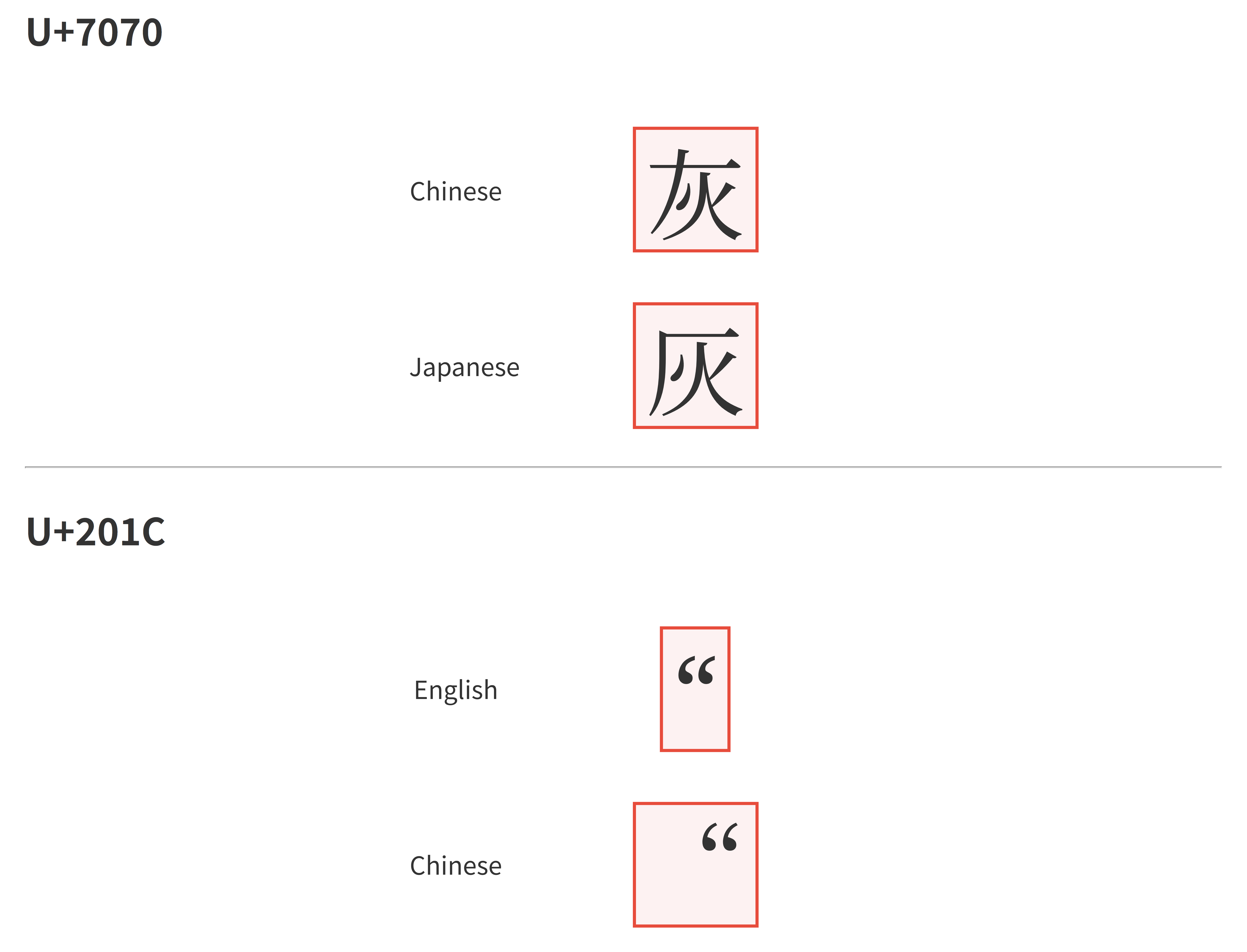
Regular expression
- Regular expression cannot parse the syntax that allows infinite nesting (because it uses finite state machine. Infinite nesting require infinite states). HTML allows infinite nesting. But it's ok to use regex to parse HTML of a specific website.
- Regular expression behavior can be locale-dependent (depending on which regular expression engine).
- There are many different "dialects" of regular expression. Don't assume a regular expression that works in JS can work in Java.
- A separate regular expression validation can be out-of-sync with actual data format. Crowdstrike incident was caused by a wrong separate regular expression validation. It's recommended to avoid separate regular expression validation. Reuse parsing code for validation. See also: Parse, don't validate
- Email validation is not easy. See also
- Backtracking performance issue. See also: Cloudflare indicent 2019 July-2, Stack Exchange incident 2016 July-20
Microsoft-related
- When using Microsoft Excel to open a CSV file, Excel will do a lot of conversions, such as date conversion (e.g. turn
1/2and1-2into2-Jan) and Excel won't show you the original string. The gene SEPT1 was renamed due to this Excel issue. Excel will also make large numbers inaccurate (e.g. turn12345678901234567890into12345678901234500000) and won't show you the original accurate number, because Excel internally use floating point for number. Related: 2010 British intelligence phone number issue. - Windows limits command length to 32767 WTF-16 code units. See also
- In Windows the default stack size of main thread is 1MB, but in Linux and macOS it's often 8MB. It's easier to stack overflow in Windows by default.
- Windows limits path length to be 260 WTF-16 code units by default.
- Windows file short name. For example,
C:\PROGRA~1can refer toC:\Program Files.
Other
- YAML:
- YAML is space-sensitive, unlike JSON.
key:valueis wrong.key: valueis correct. - YAML doesn't allow using tab for indentation.
- Norway country code
NObecome false if unquoted. - Git commit hash may become number if unquoted.
- Two different extensions of YAML file:
.ymland.yaml. Some places only accept one of them. - See also: The yaml document from hell
- YAML template command injection, see also.
- YAML is space-sensitive, unlike JSON.
- It's recommended to configure billing limit when using cloud services, especially serverless. See also: ServerlessHorrors
- Big endian and little endian in binary file and net packet.
- The current working directory can be changed by system call (e.g.
chdir). - The formats
.zipand.mp4are container formats. They can hold many different kinds of formats inside. - Sorting number strings is different to sorting numbers. "10" is smaller than "9" in string comparision.
- Configuration override. Many frameworks have configuration override mechanisms. Sometimes one configuration is correct but it still malfunctions, because another higher-priority configuraiton overrides it. An env var, a command-line argument or some config file in a faraway folder can override your config (it's framework-specific).
- Duplicated configuration. When one place changes, another place must change accordingly. Forgeting changing one causes problem. It's recommended to make configurations have single-source-of-truth.
- String concat hurts greppability. For example if there are two Kafka topics
admin-access-logguest-access-log, don't useuserType + "-access-log"to get topic name. Make full name exist in code, otherwise it cannot be text-searched. For constants like port number, don't use addition.
Footnotes
-
CSS only try to expand if the available space is finite. In may cases it has infinite vertical space by default. ↩
-
This design aim to avoid circular dependency. If parent height depends on child height, then child padding determining on parent height creates circular dependency. When that rule was originally designed, CSS mostly follows the "width flows top-down, height flows bottom-up" pricinple (that principle is broken with later-added flexbox and grid etc.) (the "top-down" is in DOM tree, not in web page). Note that when writing axis flips (e.g.
writing-mode: vertical-rl) the percentage is based on height, and the principle changes to "height flows top-down, width flows bottom up". ↩ -
If you make a child BFC, the margin collapse between siblings still remains. To prevent margin collapse between siblings, one way is to make container flexbox or grid. ↩
-
Browser will draw the stacking context into a seprate "image", then draw the image to web page (or parent stacking context). The weirdness of stacking context are caused by this separate drawing mechanism. ↩
-
In macOS it can be configured to make scrollbar take space like in Windows. ↩
-
The CSS box model includes content box, padding, border and margin, but doesn't mention scrollbar. Scrollbar is visually between border and padding. Scrollbar is conceptually in padding box. If the inner content is not intrinsically-sized, scrollbar occupies space from content box (there is padding between scrollbar and inner content, but scrollbar can steal space from inner content across padding). See also. When container is
width: 200pxit's not intrinsically-sized. The 200px width includes scrollbar. But withwidth: min-content, it is intrinsically-sized so scrollbar occupies space from outside. ↩ -
It avoids circular dependency where parent height is determined by content height, but content height is determined by parent height. ↩
-
In Aug 2026
calc-sizeis not yet supported by FireFox or Safari. ↩ -
Also, there is another solution for transition
height: auto: transitioningmax-heightfrom 0 to a large value, but I don't recommend it as it will mess up animation timing. ↩ -
In Aug 2026
interpolate-sizeis not yet supported by FireFox or Safari, same ascalc-size. ↩ -
The
<img>hasdisplay: inlineby default. Normally settingwidthorheighttodisplay: inlineelement has no effect. But there is a special case: replaced elements. So<img>works similar todisplay: inline-blockby default. ↩ -
The U+XXXX notation (XXXX is a hex value) represents a code point. In UTF-8, code point and scalar value are the same thing. But in UTF-16, it's not simple. You can understand scalar value as "real code point" that has semantic meaning. The "fake code point" is surrogate code point (U+D800 to U+DFFF). One surrogate code point itself has no semantic meaning. Two surrogate code units form a 4-byte scalar value, called surrogate pair. Note that a surrogate pair can both be seen as one code point or two code points. Because that UTF-8 is widely used, it's often that "code point" means scalar value ("real code point"). ↩
-
The encoding in API is not necessarily the actual in-memory representation. For example, Java has an optimization that use Latin-1 encoding (1 byte per character) for in-memory string if possible. ↩
-
That method is not good for large-magnitude numbers. For large numbers, the tolerance should be higher:
abs(a - b) <= max(relative_epsilon * max(abs(a), abs(b)), absolute_epsilon). Also note that equality-by-epsilon is not transitive. There are cases where A is close to B, B is close to C, but A is not close to C. Grid-based equality comparision is transitive. Related. ↩ -
Putting millisecond timestamp integer in JSON fine, as millisecond timestamp exceeds limit in year 287396. But nanosecond timestamp suffers from that issue. ↩
-
It's recommended to NOT use floating point to store money value. Note that Microsoft Excel uses floating point to represent number, and many financial data are processed in Excel. Excel has rounding so that 0.30000000000000004 is displayed as 0.3 . Only use Excel for finance if you don't require high precision. Doing rough financial analyzing in Excel is fine. ↩
-
The fact that floating point doesn't satisfy associativity hinders optimizations. If you want to enable these optimization in Rust, use
algebraic_*operators. In C/C++ it requires compiler-specific options. See also Beware of fast-math. When these optimizations are enabled, computing Nan or Infinity can lead to wrong results. Related: compiler assume integer addition/multiplication has associativity, because overflow is undefined behavior. ↩ -
Java serialization can serialize lambdas without requiring extra user biolerplate code. So Flink still uses Java serialization for job graph despite the drawbacks. ↩
-
JS
WeakMapuses ephemeron mechanism. When the GC scans entries inWeakMap, it only scans value if key object is scanned. The JVM GC doesn't have such feature. InWeakHashMapthe GC will unconditionally scan the value. ↩ -
Some exceptions: If the byte pointer comes from
mallocthen it's fine. If the object lifetime was started before (byte pointer was converted from valid object pointer), it's also fine. Explicitly callingstd::start_lifetime_aswill start lifetime, which is also fine. But the recommended way is to not do pointer convertion. The recommended way is to have local variable then memcpy into local variable, e.g.T x; memcpy(&x, byte_pointer, size);. ↩ -
Using pointer type to hold integer is fine as long as you don't use it to access memory. About byte pointer: turning object pointer into byte pointer then use byte pointer to access memory is fine. But converting byte pointer to object pointer is not fine (exception: converting object pointer to byte pointer then back to object pointer is fine). ↩
-
It's ok to have two provenances' pointers equal, as long as you don't use both for memory access. For example, you can have the pointer-to-after-last-element-in-array, that pointer can equal to another pointer in another provenance, but using that pointer for comparision only is fine. Also, pointer provenance doesn't separately on fields within one allocation, and doesn't separate on different elements in one array. The XOR linked list doesn't work with pointer provenance and should not be used (but if pointers are replaced by arena indexes, XOR linked list can work). ↩
-
Exception: C++ has interior mutability. Changing
mutablefield of aconstobject is not undefined behavior. See also. Also, even for const objects, it's mutable in constructor. Const only applies after construction. ↩ -
The read-only here is in-language constraint. It should not be confused with read-only memory which is actually immutable. ↩
-
The
std::moveitself doesn't move. Thestd::movejust converts reference to rvalue reference. When passed aconst T&it givesconst T&&. However, the move constructor takesT&&, notconst T&&, so it cannot invoke the move constructor, instead it will invoke copy constructor which takesconst T&(const T&&can convert toconst T&). In C++, the "moved out" object is still alive and will be destructed. The "move" requires mutating the original object to make it "hollow". So moving cannot work with const object. ↩ -
Start from C++26, trivial infinite loop (e.g.
for(;;);) is not undefined behavior. ↩ -
The "allocator" here doesn't mean std allocator type. It means the allocator backing
mallocandfree, managing its own heap. For example, a dynamic library can static link a piece of jemalloc. And two such different jemalloc can co-exist in a process, and also co-exist with glibc allocator. Each allocator has its own machine code and static data. ↩ -
When overcommit is enabled,
mallocmay still return null. For example, when size argument is too large. Also, when virtual address space size is limited (RLIMIT_AS),mallocwill return null when the process' virtual address space is used up. However, the cgroupmemory.max(this is how containers limit memory usage) doesn't makemallocfail when OOM, and will make process be OOM-killed when accessing allocated memory. ↩ -
Some fun facts about Sqlite type affinity: The type
floating pointhas integer affinity (because it includesint), and will auto-convert real number 1.0 to integer 1. The typestringhas numeric affinity and will auto-convert string "01234" to number 1234. ↩ -
It's recommended to use spatial index in MySQL and GiST in PostgreSQL for ranges. For non-overlappable ranges, it's possible to efficiently query using just B-tree index:
select * from (select ... from ranges where start <= p order by start desc limit 1) where end >= p(only require index ofstartcolumn). ↩ -
It can be solved in serializable level. Without serializable level, it can also be solved by special constraints in schema. For conditional uniqueness constraint, use partial unique index. For range uniqueness constraint, use range type and exclude constraint. For uniqueness across two tables, insert redundant data into another table with unique constraint. (Related: in MySQL repeatable read level,
select ... for updatewill do gap lock on index which can prevent write skew, but gap lock may cause deadlock.) ↩ -
In Kafka, a new consumer's offset initializes on first poll asynchronously. One workaround is to use
auto.offset.reset=earliest, then add version check to avoid useless updates when consuming old messages. Another workaround is to synchnnously get end offsets (watermark offsets) then manually seek to the offset, then initialize the in-memory state. Another workaround is to just use periodic polling for update, and kafka message just triggers extra immeidate polling. ↩ -
In JS,
stringis primitive type, not object type. In JS you don't need to worry about two strings with same content but different reference like in Java. However theStringin JS is object and use refernce equality. ↩ -
The
useCallbackis a hook that cannot be called multiple times in a component. If there are variable amounts of callbacks, you canuseMemoa data structure that contains many callbacks. Or you can justuseMemothe array of React elements. The React elements (e.g.<MyComponent x={y}/>) are just data, not actual DOM. ↩ -
Word "render" has ambiguity. The render here means drawing contents on web page. The React component rendering corresponds to calling the component function. ↩
-
Next.js encrypts captured values in server function closure, so this is mitigated. But the return value of server function is not encrypted. And the client component props are not encrypted. ↩
-
Note that HTTP/1.0 Keep-Alive is different to TCP keepalive. ↩